Short answer. Amazon A+ Content for books is the set of images, text and comparison tables shown under "From the Publisher" on your book's Amazon page. Any KDP author can add it to a live or pre-order book from the KDP Marketing page. You build it from up to 5 of 17 modules, and approved content appears within eight business days.
Key points
- A+ Content sits under "From the Publisher". Most readers scroll to reach it.
- It works for live books and pre-orders, not drafts.
- One project can cover the ebook, paperback and hardcover of the same book.
- Up to 5 modules per page, chosen from 17.
- No customer reviews, prices, "free", "new" or links. At most 4 quotes, from well-known publications or public figures.
- Each Amazon store needs its own published copy.
- Our Amazon book listing optimization can add a 3-module A+ set to the listing.
What is A+ Content on an Amazon book page?
It is an extra section of images and text below the description. KDP's help page says it shows "under the From the Publisher section" and that, while the exact spot varies, "most readers will need to scroll to view the content."
So it is not what a reader sees first. The cover, title, price and the opening lines of the description come first. A+ Content is for the reader who has scrolled down and is still deciding.
Who can use Amazon A+ Content for books?
Any KDP author with a live book or a pre-order. KDP says A+ Content is available for published KDP books, and that you can add it to "Live titles and pre-orders". You cannot add it before the book is published or set up for pre-order.
You can only apply it to books in your own KDP account. KDP returns an error for any ASIN that is not on your Bookshelf.
None of the four KDP help pages on A+ Content that we read on 13 October 2026 mentions a fee for using it.
Which Amazon stores show it?
From kdp.amazon.com you can publish A+ Content to 12 stores: the US, Canada, Australia, Brazil, Mexico, the UK, Germany, Spain, France, India, Italy and the Netherlands. Japan is published separately from kdp.amazon.co.jp.
Each store needs its own published version. KDP copies a draft into other stores that support the same language, but you still open each one and submit it. Readers see the version in their preferred language, so Spanish A+ Content on Amazon.com shows only to shoppers who chose Spanish.
What can I put in it?
Images, text and comparison charts, built from modules. KDP's examples page says there are 17 modules and you can use up to five on one page.
Five of the modules KDP shows for books:
| Module | What it is for | Smallest image KDP accepts |
|---|---|---|
| Standard Image & Text Overlay | A banner with a few lines of text | 970 x 300 px (KDP suggests 1940 x 600) |
| Standard Single Left Image | Author photo or a character, with text | 600 x 180 px (KDP suggests 600 x 600) |
| Standard Three Images and Text | Scenes or pages from the book | 300 x 300 px (KDP suggests 600 x 600) |
| Comparison Chart | Your other books in a series, up to 5 | 150 x 300 px |
| Standard Product Description Text | Text only, up to 6,000 characters | none |
The comparison chart can only compare books in your own KDP account. KDP also says not to put text inside the background image of the overlay module; the text goes in the overlay box.
What does A+ Content add that the description cannot?
Room for pictures. The description field is text only, and KDP does not accept reviews or quotes in it. A+ Content can show the cover art at size, a series in order, an author photo, or a page from the book.
It can also carry up to four quotes from well-known publications or public figures, with the source named. Reviews from customers or private people are not allowed in either place. For editorial reviews, KDP points authors to Amazon Author Central.
What A+ Content will do for sales, nobody outside Amazon can say. KDP's help pages describe it as giving readers more information as they consider the book. They publish no figure for what it adds, and we do not promise one.
The fix we do for this: A+ Content made to match your cover. We design a 3-module set and write each image's alt text, and you add it in KDP's A+ Content Manager yourself. It costs $99 on its own in 5 business days, or $219 together with Amazon book listing optimization in 7. Ask about A+ Content.
What gets A+ Content rejected?
KDP lists its most common rejection reasons first:
- Prices, discounts or promotion words such as "affordable", "bonus" or "free".
- Buying language such as "buy now" or "add to cart".
- Customer reviews.
- Time words such as "now", "new", "latest" or holiday references, and mentions of Kindle Unlimited.
- More than four quotes.
Other rules catch book authors out. No quotes from private people. No web links, and nothing that sends readers to another page on Amazon or off it, even for your own other books. No comparisons with other authors' books. No awards older than two years, and any award needs its date and the body that gave it.
The writing rules go down to punctuation. KDP asks you to spell out numbers under 10, use serial commas, and capitalize each major word in a header. Bold and italic are meant for headings or a few words only.
Would our own sample module pass these rules?
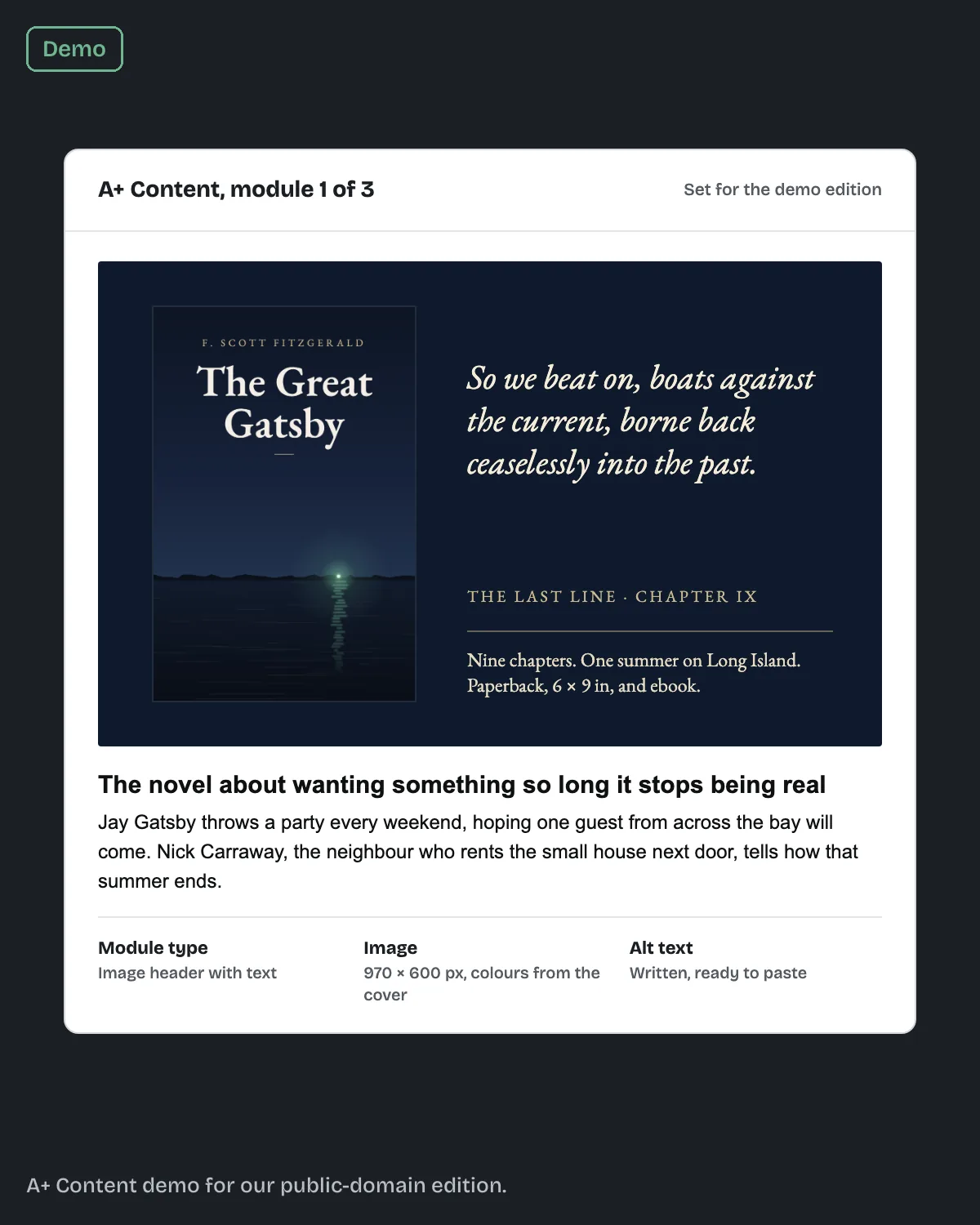
For our Great Gatsby sample edition we made an image header module with text, using a 970 x 600 px image in the cover's colors, with the alt text written. Its headline reads "The novel about wanting something so long it stops being real". A line in the image reads "Paperback, 6 × 9 in, and ebook."
On 13 October 2026 we read both lines against KDP's guidelines. Two would need changing before submission. The headline is in sentence case, and KDP asks for each major word in a header to be capitalized. The trim size uses the numerals 6 and 9, and read literally, the rule says to spell out numbers under 10. Neither is the kind of mistake you spot by looking at the design. You only find it by reading the guidelines line by line.
What are the image rules?
JPG or PNG, in RGB color. CMYK files are not supported, and animated images such as GIFs are not allowed.
KDP's pages differ on file size. The guidelines say each file must stay under 2 MB, and the examples page gives 3 MB as the maximum. Keep every image under 2 MB and both are met.
For resolution, the guidelines set a floor of 72 dpi, and the Create A+ Content page recommends 300 DPI and calls anything under 200 low resolution. KDP also says it will not resize images, so save each one at the size the module asks for. Our post on KDP image resolution shows how to check the real DPI of a file.
Two more rules from KDP's list: don't reuse the images already in the book's image gallery, and write alt text that describes the image for someone using a screen reader. Alt text that does not describe the image can get the content rejected.
How do I add A+ Content in KDP?
From the KDP Marketing page. Scroll to A+ Content, choose a store and click Manage A+ Content. In the A+ Content Manager:
- Click Start creating A+ content, and enter a content name and the language.
- Add modules, then add images and text to each.
- Click Next: Apply ASINs and add every format of the book.
- Preview it on desktop and mobile, then click Submit for approval.
KDP says compliant content appears within eight business days, and longer at busy times. If something needs changing, KDP sends an email.
To take it down, you can suspend it, which keeps the project to edit later, or delete it, which cannot be undone.
What else do authors ask about Amazon A+ Content for books?
None of KDP's four A+ Content help pages we read lists a fee.
No. It works for live books and pre-orders only.
Not customer reviews. You can use up to four quotes from well-known publications or public figures, with the source named.
Up to eight business days after you submit, if it meets the guidelines.
No. One project can be applied to every format's ASIN. You do need a separate version for each Amazon store.
What should you do next?
Open the KDP Marketing page, look at the module list, and sketch which three or four modules suit your book. Check every line against KDP's guidelines before you submit. When the description above the A+ section needs work too, our post on KDP description HTML has a template you can paste. If you would rather have the set made for you, see the A+ Content section on our Amazon book listing optimization page.