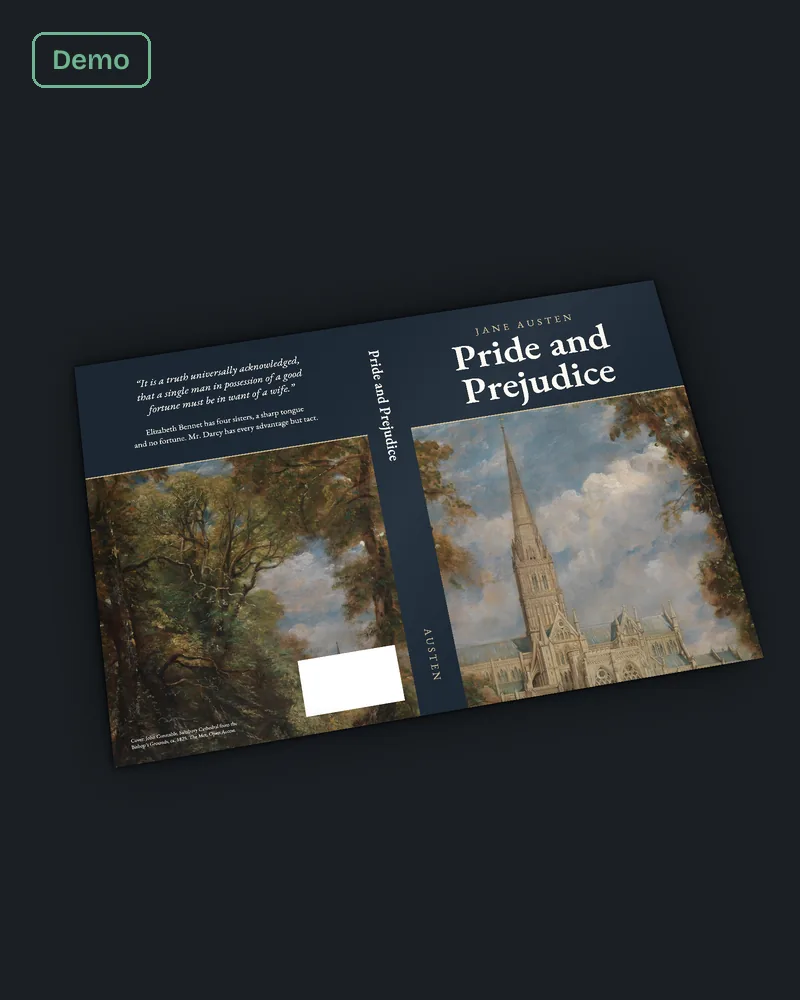
Short answer. For KDP barcode placement, the simplest route is to leave it off. KDP then adds a barcode to your back cover at no cost. If you add your own, KDP suggests 2 x 1.2 inches, at least 0.25 inch from the spine and trim, in 100% black on solid white. Either way, keep that corner clear of art and text.
Key points
- KDP provides a barcode free if your cover file has none.
- KDP rejects a cover with images or text in the barcode location.
- Your own barcode: 2 x 1.2 inch suggested, 1.4 x 0.8 inch minimum.
- At least 0.25 inch (6.3 mm) from the spine and the trim.
- 100% black on a solid white background, not flattened into the cover image.
- Our cover wrap and spine service designs the back cover around that box from the start.
Does KDP provide a barcode?
Yes. KDP's "Barcodes" help page says that if you upload a cover without a barcode, or use Cover Creator, KDP places one on your back cover. Its fix advice calls this route recommended, says it costs nothing extra, and says Amazon placed barcodes are guaranteed to meet its manufacturing rules.
So most authors never need to make a barcode. What they do need is an empty spot for KDP to put it.
What is the correct KDP barcode placement?
On the back cover, in the barcode margin shown on KDP's cover template. KDP's cover page says that for right to left books, the barcode goes in the lower left corner of the back cover. For left to right books, the help pages leave the spot to the template, so download it for your exact trim and page count.
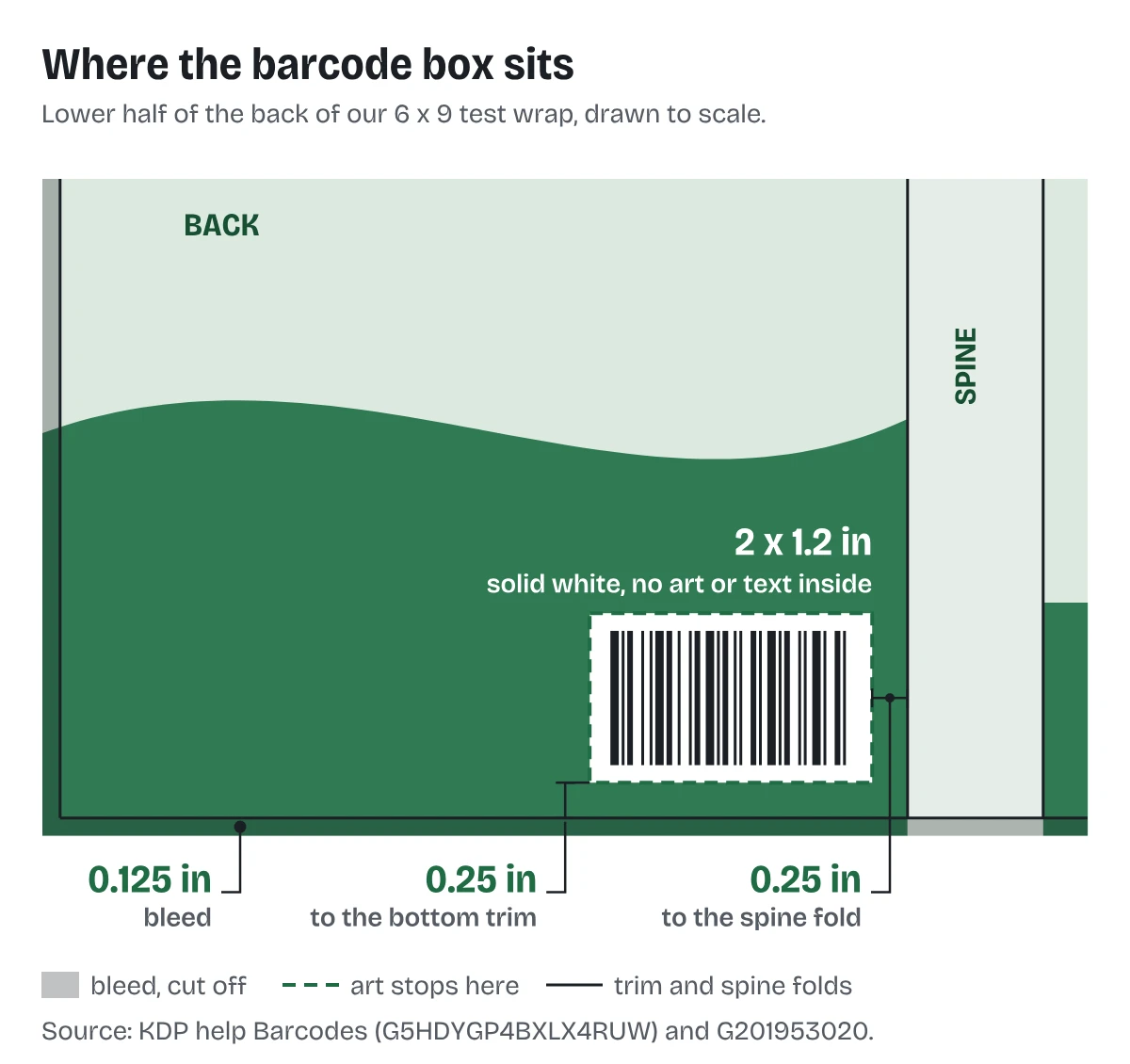
On our own 6 x 9 sample wrap, built on 10 October 2026, we kept a white box of 2 x 1.2 inches in the lower right of the back cover. It sits 0.25 inch up from the bottom trim and 0.25 inch in from the spine fold. That matches KDP's suggested size and its minimum distances.
Our post on the KDP cover template generator shows how to read the barcode margin on the template.
What if the barcode covers my artwork?
Move the art, not the barcode. KDP says covers with images or text in the barcode location will be rejected. Its help pages offer no way to move the barcode to suit your design.
Three ways to handle it:
- Shift the back cover text up so the bottom corner is free.
- Let the background run under the box, but keep faces, type and detail out of that corner.
- Put a calm area of the image there, such as sky, a wall or a solid band.
If the back cover came from an ebook design, there is no back yet. It has to be built, and the barcode corner is part of that build. Our post on KDP paperback cover size and spine width covers how the back panel is sized.
The fix we do for this: we lay out the back cover with the barcode box reserved first, then place the blurb and art around it. Converting an ebook cover to a full wrap costs $99 in 5 business days; a new wrap is $249 in 7 with 2 revision rounds. Send us your cover.
What are KDP's rules for your own barcode?
If you supply one, KDP's "Barcodes" page lists the requirements:
- Vector preferred. A raster barcode must be 300 PPI and sharp.
- 100% black. Not RGB or CMYK black, not registration black.
- Suggested 2 x 1.2 inches (50.8 x 30.5 mm). Minimum 1.4 x 0.8 inches (35.56 x 20.3 mm).
- At least 0.25 inch (6.3 mm) from the spine and trim.
- Solid white background, right side up, square to the cover.
- Not flattened into the main cover as a single image.
If it carries an ISBN, the ISBN must match your book's exactly and not overlap any text. A price code, if you add one, must match the list price.
A QR code or UPC is allowed as well, but not in the space kept for the ISBN barcode.
What does "barcode failed validation" mean?
KDP's scanner could not read your barcode. KDP gives two fixes: correct it to the rules above, or remove it and upload again so KDP adds its own. KDP recommends the second.
What about the Transparency code?
KDP has retired it for new books. The "Barcodes" page says Transparency codes are not available for books created after November 2025. Books published before then may still print with one. It does not change the size of the barcode box.
What else do authors ask about KDP barcode placement?
No. KDP adds one at no extra cost if your cover has none.
KDP suggests 2 x 1.2 inches for your own, with a minimum of 1.4 x 0.8 inches.
Not visibly. KDP rejects covers with images or text in the barcode location.
KDP's cover page says those books do not need ISBN information on the cover.
Yes, outside the space kept for the ISBN barcode.
What should you do next?
Download KDP's cover template for your trim and page count, find the barcode margin, and keep that corner empty. If the back cover needs building around it, send your page count through our cover wrap and spine page.