Short answer. The KDP cover template generator is a free page on KDP where you enter binding, ink, paper, trim size and page count, and get the full cover dimensions plus a template as a PDF and a PNG. Put it under your artwork as a guide layer, keep text inside the safe areas, and hide it before you export.
Key points
- The generator needs five things: binding, interior type, paper, trim size and final page count.
- It gives a PDF and a PNG to use as a guide layer, not a finished cover.
- The template shows the full cover, bleed, safe area, spine, spine safe area and barcode margin.
- The template is only right for the page count you typed. Change the interior, make a new template.
- Remove every template line and label before you export the cover PDF.
What is the KDP cover template generator?
It is KDP's Print Cover Calculator and Templates page at kdp.amazon.com/cover-calculator. The page opens without a KDP sign-in. It says it gives you the exact dimensions of your cover and a template, in PDF and PNG, "to be used as a guide layer in your image editing software."
When we opened it on 13 October 2026, the form asked for binding type, interior type, paper type, reading direction, measurement units, trim size and page count, in that order. Each field stays locked until the one above it is filled.
What do I need before I use it?
The final page count of your interior. Everything else you already know.
The page count sets the spine width, and the spine width sets the full cover width. KDP's formula is page count times the thickness of one page: 0.0025 inch on cream paper and 0.002252 inch on white. So a cover template made from a guess goes stale the moment the interior changes. Our post on KDP paperback cover size and spine width by page count has the table.
This is why our cover wrap and spine service waits for the final interior before it sizes anything.
How do I read the template?
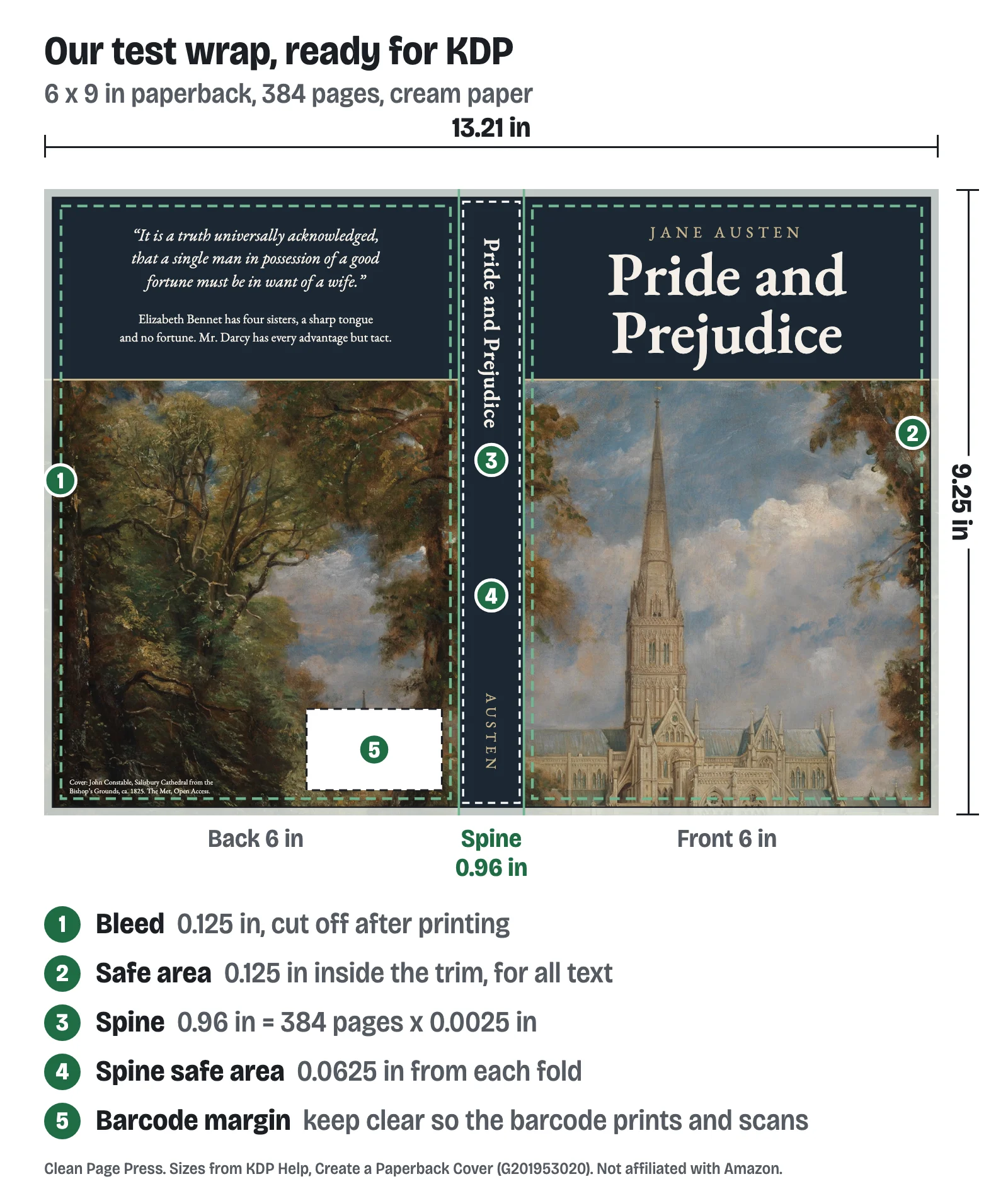
KDP's help page names each zone the template draws:
- Full cover. The whole file: back, spine, front and the bleed around them.
- Front cover. The visible front after trimming. The back is the same size.
- Bleed. The outside 0.125 inch that is cut off. Background art runs into it.
- Margin. No text or images here unless they are meant to wrap.
- Safe area. Every word and logo goes inside it.
- Spine and spine safe area. Spine text stays inside the spine safe area so it does not shift onto the covers.
- Spine margin. Nothing important goes here.
- Barcode margin. The space kept for the barcode so it prints and scans.
Read it from the outside in. Art to the outer edge, words inside the safe area, barcode zone empty. Our post on KDP cover bleed and the safe zone draws each zone to scale on a 6 x 9 wrap.
What does a finished template size look like?
Our sample wrap is a 384-page 6 x 9 book on cream paper. The spine is 384 x 0.0025 = 0.96 inch. The full cover is 0.125 + 6 + 0.96 + 6 + 0.125 = 13.21 inches wide and 9 + 0.25 = 9.25 inches tall. That is the size written on the wrap on our cover page, and it is what the template's full cover box has to match.
Add ten pages to that book and the spine grows by 0.025 inch, so the template and the cover both change.
What will the template not do for me?
Four things, and each one causes rejections.
- It does not check your artwork. It is a guide. KDP checks the cover after upload in Print Previewer.
- It does not update itself. A template for 384 pages is wrong for 390.
- It does not decide spine text. KDP prints spine text only on books with more than 79 pages, and Cover Creator needs 80. Under that, the spine stays blank.
- It must not be printed. KDP's checklist says to remove crop marks, color bars, template text and PDF creation guides. A template line left on a visible layer is printed or rejected.
The fix we do for this: we build the wrap from your ebook cover's source files, with the spine worked out from your final page count, for $99 in 5 business days, or design a new full wrap for $249 in 7 business days with 2 revision rounds. Tell us your trim and page count.
Which numbers on KDP's pages disagree?
Two, when we read them on 13 October 2026.
The generator's own page count message says "Page count must be between 24 - 830" for paperback. KDP's trim size table lists 24 to 828 for black ink on white paper. We work to 828.
KDP's cover help says a spine shift of "0.0125" (3.2mm)" either way is within print variance. 3.2 mm is 0.125 inch, ten times more than 0.0125. We keep spine text clear by the stated 0.0625 inch and avoid hard color edges on the spine, which KDP also advises against.
How do I use the template in my design program?
Open the PNG or PDF as the bottom layer, at the full cover size. Build the art on layers above it. Keep the template visible while you work, then hide or delete it before you export.
Export one single-page PDF with the back, spine and front together. KDP asks for 300 DPI images, embedded fonts and flattened transparencies, and recommends a file under 40 MB.
What else do authors ask about the KDP cover template generator?
Yes. The page opens without signing in to KDP.
It shows a barcode margin. If you do not add your own barcode, KDP places one on the back cover.
No. Pick Hardcover as the binding. Hardcover covers wrap a board and have different measurements.
Make a new template with the new count and refit the art to the new spine.
No. Template text and guides must be removed.
What should you do next?
Get your final page count from the interior PDF, then run the generator with it. Already have an ebook cover? The $99 conversion on our cover wrap and spine page turns it into the full wrap at that count.