
Short answer. KDP cover bleed is 0.125 inch added to the top, bottom and outside edges of your full wrap, and any background must run all the way into it. Text goes at least 0.125 inch inside the trim, spine text 0.0625 inch from each fold, and your own barcode, if you add one, 0.25 inch from the spine and trim.
Key points
- Every KDP paperback cover has bleed. There is no no-bleed option for covers.
- Bleed: 0.125 inch (3.2 mm) past the trim on the top, bottom and outside edges.
- Text: at least 0.125 inch inside the trim lines.
- Borders, if you must have one: at least 0.25 inch inside the trim.
- Spine text: 0.0625 inch (1.6 mm) clear of each spine edge.
- Our cover wrap and spine service builds the wrap to these lines and checks the PDF before you upload.
What is KDP cover bleed?
The extra 0.125 inch of image that gets cut off when your book is trimmed. KDP's "Create a Paperback Cover" page says all covers have bleed. Backgrounds and images must reach 0.125 inch past the final trim line on all outside edges.
Without it, the blade can leave a thin white line along the edge. KDP's fix page says a cover with white space around the edges "may fail for bleed."
This is different from the interior, where bleed is a choice. Our post on KDP bleed vs no bleed covers the interior side.
Which edges get the bleed?
The top, the bottom and the two outside edges of the wrap. The folds at the spine get none, because the back, spine and front are one printed sheet.
So the bleed adds 0.25 inch to the width and 0.25 inch to the height of the file. KDP's formula:
- Cover width = bleed + back cover + spine + front cover + bleed
- Cover height = bleed + trim height + bleed
What is the safe zone on a KDP cover?
The area inside the trim where text and anything important must sit. KDP's numbers:
| Item | Rule | KDP's page |
|---|---|---|
| Background and images | Reach 0.125 in past the trim | Create a Paperback Cover |
| Front and back text | At least 0.125 in inside the trim | Create a Paperback Cover |
| Borders | At least 0.25 in inside the trim | Create a Paperback Cover |
| Spine text | 0.0625 in from each spine edge | Create a Paperback Cover |
| Fold drift allowed | 0.0625 in either side of each fold | Create a Paperback Cover |
| Your own barcode | At least 0.25 in from spine and trim | Barcodes |
In Print Previewer, KDP shows the safe zone as dashed red lines. All text has to fit inside them.
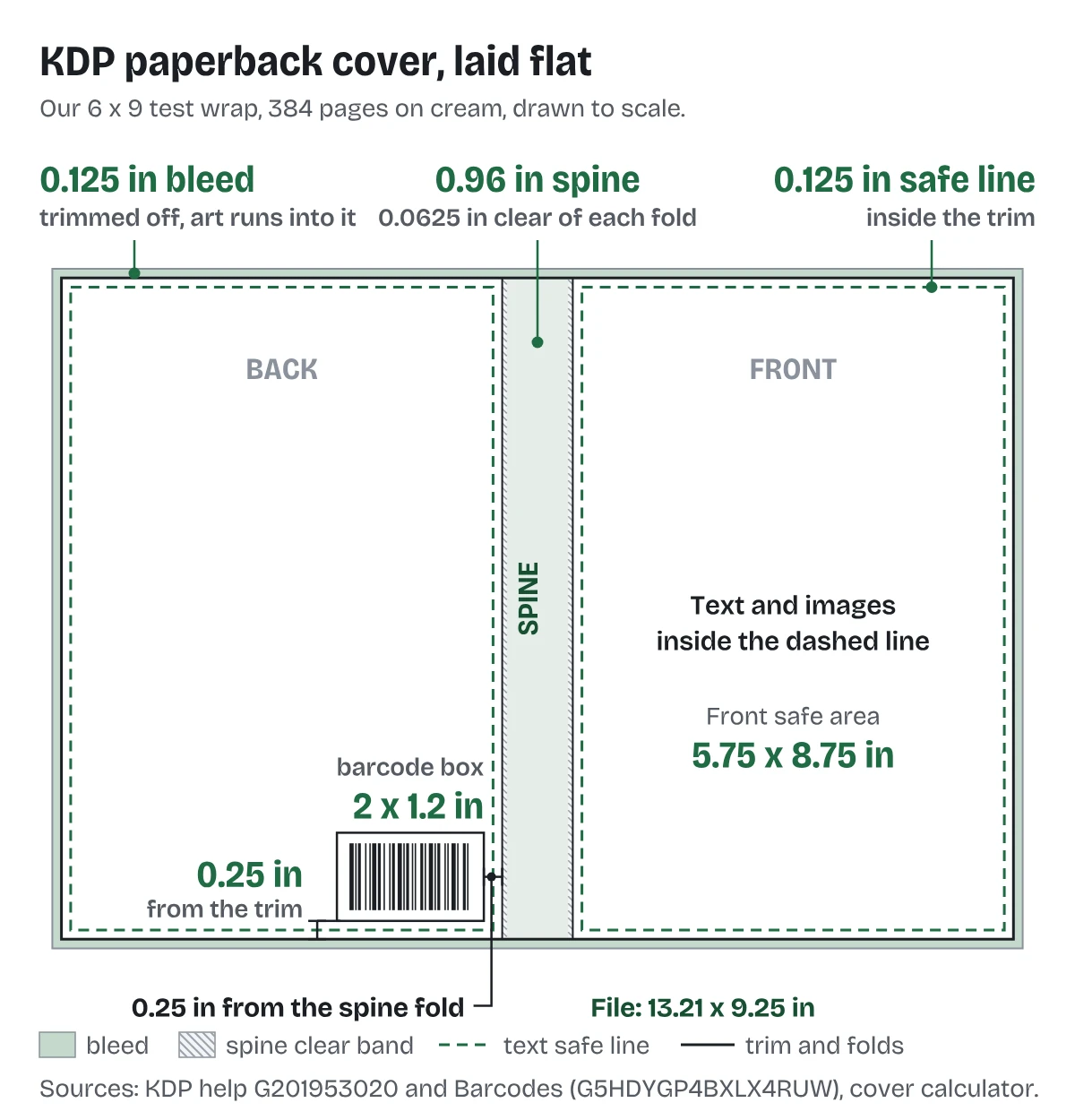
What are the numbers on a real 6 x 9 wrap?
Here is our sample wrap, built on 10 October 2026: 6 x 9 inches, 384 pages, cream paper.
- Spine: 384 x 0.0025 = 0.96 inch.
- Full file: 0.125 + 6 + 0.96 + 6 + 0.125 = 13.21 inches wide, by 9 + 0.25 = 9.25 inches tall.
- At 300 DPI that is 3,963 x 2,775 pixels.
- Trim line: 0.125 inch in from every outer edge of the file.
- Text safe area on the front: 5.75 x 8.75 inches, the 6 x 9 panel less 0.125 inch on each side.
- Room for spine text: 0.96 minus 0.125 = 0.835 inch.
On the guide version of that wrap we drew the bleed as a washed band and the text safe lines as dashed green boxes. The white barcode box sits 0.25 inch up from the bottom trim and 0.25 inch in from the spine fold.
Why does KDP ask for so much room?
Because trimming and folding move. KDP allows the spine to shift within its print variance, and it calls a copy defective only past that. It also asks for 0.0625 inch of allowance either side of each fold.
KDP's text on this has a typo worth knowing. It gives the spine shift as "0.0125" (3.2mm)". 3.2 mm is 0.125 inch, ten times bigger. We design for the larger number. Our post on the KDP cover template generator notes the same mismatch.
The practical rule: no hard color edge on a fold, no thin border, and no text near any line the blade or fold touches.
The fix we do for this: we set the canvas from your trim size and final page count, run the background into the bleed, keep every word inside the safe lines, and check the PDF against KDP's cover specs. Converting an ebook cover costs $99 in 5 business days; a new wrap is $249 in 7. Tell us your trim and page count.
What makes a cover fail for bleed?
From KDP's cover size fix list and what we check:
- The file is sized to the trim, not trim plus bleed.
- A white margin runs around the art.
- The background stops at the trim line instead of 0.125 inch past it.
- Crop marks are left on. KDP says no crop marks.
- The spine was sized from an old page count, so every line after it is off.
If the error is already on your screen, our post on KDP cover error messages matches each message to its fix.
What else do authors ask about KDP cover bleed?
0.125 inch (3.2 mm) on the top, bottom and outside edges.
No. The folds sit inside one printed sheet.
At least 0.125 inch. We keep titles further in.
KDP advises against it. If you do, it must be at least 0.25 inch inside the trim.
The full size with bleed and a template showing the bleed, safe area, spine and barcode margin.
What should you do next?
Get your full cover size from your trim, paper and final page count, then draw the trim and safe lines before placing any text. If you are starting from an ebook front cover, our KDP cover wrap template post shows how to build it into a full wrap, step by step. If you want the wrap built and checked for you, start on our cover wrap and spine page.