Short answer. IngramSpark PDF requirements are stricter than KDP's. The interior must be one single-page PDF, saved as PDF/X-1a:2001 or PDF/X-3:2002, with every font embedded and no crop marks. Bleed is 0.125 inch on three edges, never the spine side. KDP's guidelines never mention PDF/X, so a file KDP accepted can still be rejected.
Key points
- IngramSpark's File Creation Guide asks for PDF/X-1a:2001 or PDF/X-3:2002. KDP's Paperback Submission Guidelines do not mention PDF/X at all.
- Files with unembedded fonts are rejected. Acrobat's default Standard setting does not embed the base 14 fonts.
- Spreads (2-up pages) are rejected. So is an interior sent as more than one file.
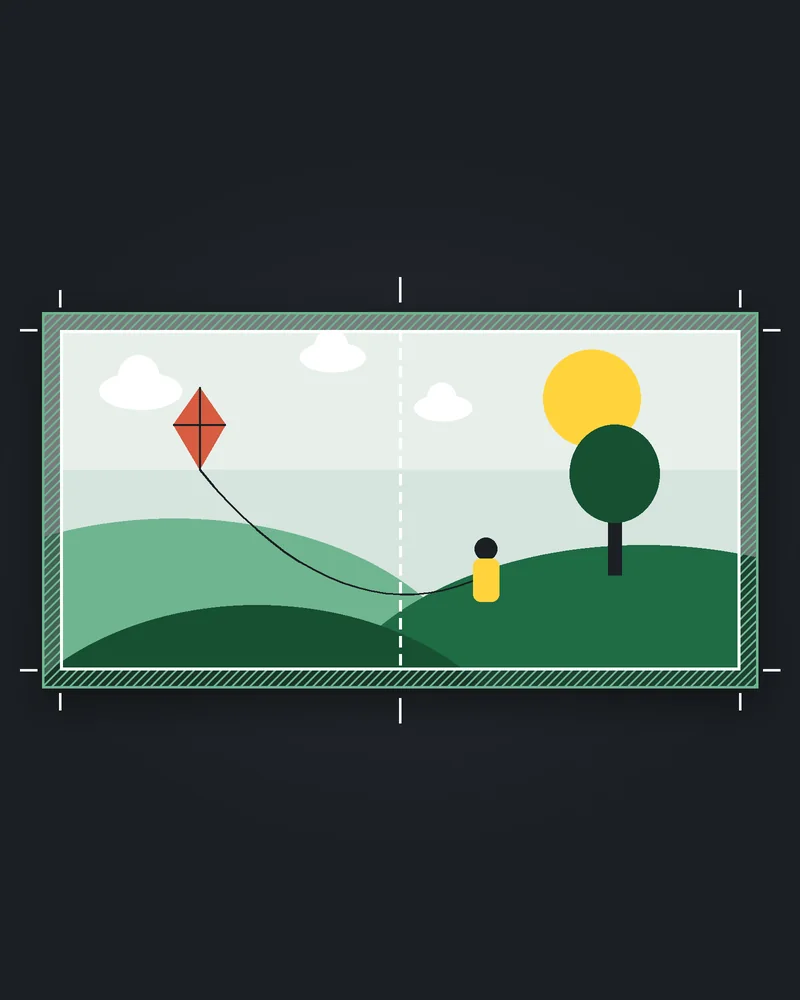
- Bleed is 0.125 inch on the top, bottom and outside edge. No bleed on the bind edge.
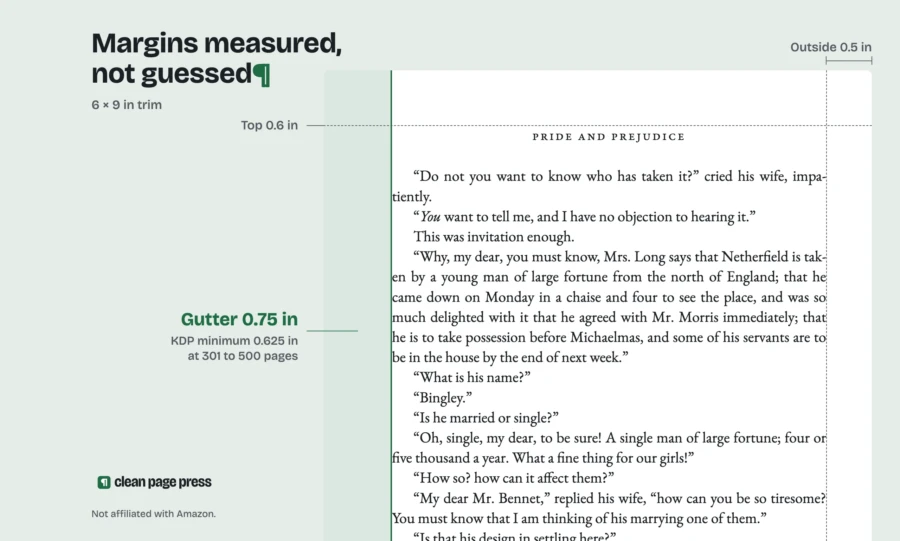
- IngramSpark recommends at least 0.5 inch margins on all sides. KDP allows 0.25 inch outside margins on a book without bleed.
- Black and white images should be grayscale. RGB or CMYK images are converted at print and the color can shift.
What are IngramSpark's PDF requirements for an interior?
The IngramSpark PDF requirements live in one document, the File Creation Guide. The copy we read on 16 October 2026 was dated 8.24.26. Its black and white quick reference lists the core of it.
The file is a PDF made with Acrobat Distiller or exported from InDesign, as PDF/X-1a:2001 or PDF/X-3:2002. Line art goes in at 600 ppi as 1-bit. Grayscale photos go in at 300 ppi as 8-bit. The color space is grayscale.
Bleed is 0.125 inch (3 mm), added to the three trim edges only. Margins are a recommended minimum of 0.5 inch (13 mm) on all sides. The web upload takes files up to 1.5 GB.
That is the spec. If you would rather not set it yourself, our paperback interior formatting lays out the PDF at your trim size with the margins and bleed set for your page count.
Why does a file KDP accepted fail at IngramSpark?
Because the two printers check different things. KDP's Paperback Submission Guidelines ask for embedded fonts, flattened transparency, 300 DPI images, single pages and no crop marks. They do not name a PDF standard.
KDP will even take a Word file. Its guidelines say a book without bleed can go up as DOC, DOCX, RTF, HTML or TXT, and KDP converts it to PDF. IngramSpark's guide lists PDF as the preferred format and asks for a PDF/X preset.
So a file can pass every KDP check and still be the wrong kind of PDF for IngramSpark. The most common gaps follow, each one from IngramSpark's own guide.
Is the PDF saved as PDF/X-1a or PDF/X-3?
This is the first thing to check. The guide's color section says files "must be PDF/X-1a:2001 or PDF/X-3:2002 compliant". The black and white quick reference names the same two presets.
A plain "Save as PDF" from Word or a browser print dialog does not produce PDF/X. The guide names Acrobat Distiller and InDesign as the PDF producers. In both, you pick the PDF/X preset at export and leave the other defaults alone.
If your KDP file came out of a quick export, assume it is not PDF/X until you check it.
Are all the fonts embedded?
IngramSpark's rule is short: "ALL FONTS must be embedded in all PDF files". Files with unembedded fonts are rejected, and Lightning Source, the Ingram printer named in the guide, asks for a corrected file.
To check, open the PDF in Acrobat, go to File, then Properties, then the Fonts tab. Every font listed should say (Embedded) or (Embedded Subset). If one does not, it is not embedded.
The trap is the base 14 fonts, such as Times and Helvetica. The guide warns that Acrobat's default Standard setting does not embed them. A file can look fine on screen and still fail here.
KDP asks for the same thing. Its guidelines say all fonts "should be embedded in the native program before publishing". The difference is in how the files get made: a Word upload to KDP is converted by KDP, so the author never sees whether the fonts went in.
Is the bleed on the right edges?
If anything in your interior runs to the edge of the page, both printers want 0.125 inch of bleed on the top, bottom and outside edges. The guide is firm on the fourth edge: do not add bleed to the bind (gutter) edge, because it "will cause incorrect positioning".
For a 5.5 x 8.5 book with bleed, the guide's US bleed chart gives a page size of 5.625 x 8.75 inches. That matches KDP's rule of adding 0.125 inch to the width and 0.25 inch to the height.
If your book has no edge-to-edge images, build the pages at exact trim size and skip bleed. Our post on KDP bleed vs no bleed shows how to tell which one your book needs.
The fix we do for this: we lay out your paperback interior as a print PDF at your trim size, with fonts embedded, margins and bleed set for your page count, and send you screenshots of the checks. IngramSpark setup is $99 per book in 3 business days: you upload to IngramSpark yourself and we never log in. Get a free sample page.
Are the margins wide enough for IngramSpark?
This one catches short books. KDP's minimum margin table allows a 24 to 150 page book a 0.375 inch inside margin and 0.25 inch outside, top and bottom when there is no bleed. IngramSpark recommends at least 0.5 inch on all sides of the text block.
The guide gives the reason: printing can vary by 1/16 inch (0.0625 inch). Text or images too close to the trim could be cut off in printing and binding.
The 0.5 inch figure is written as a recommendation, not a rejection rule. Even so, a KDP file built at the minimums puts your page numbers and running heads closer to the knife than IngramSpark advises. For color books in perfect bound or hardcover, the guide adds a further 0.125 inch white strip on the bind side, on top of the 0.5 inch margin.
Is the file one single-page PDF?
IngramSpark says it cannot accept files in spread format (2-up per page). The interior must be one single-page PDF. The color section adds that submissions with multiple files are rejected, though a single file inside a zip is accepted.
KDP also requires single pages, so most KDP files already pass this. Check it anyway if you exported from a layout tool with a spreads option switched on.
Leave out crop, printer and registration marks too. The guide says marks in the file could show up in printed copies.
What about images and color?
For a black and white interior, the guide recommends converting every image to grayscale before you upload. Images left as RGB or CMYK are converted to grayscale at print, and that "can sometimes cause a color shift". Any dissatisfaction with that shift is on the publisher.
It also asks for no spot colors and no ICC profiles in a black and white file. An ICC profile on 100% black text can turn it into a shade of gray in the proof.
Resolution follows the quick reference: 300 ppi for grayscale photos and 600 ppi for line art. The color section says images under 72 ppi will be rejected. KDP sets its own minimum at 300 DPI. Our post on KDP image resolution covers how to check the real resolution of an image once it is placed on the page.
For color interiors, every image must be CMYK, and total ink should not go over 240%. Files above 240% may be rejected for correction.
Does IngramSpark change my page count?
It can. The guide says every interior is stored with a page count divisible by two, and the last page is left blank for Lightning Source's manufacturing information. If needed, it adds pages to reach the right count.
So plan for that last blank page. If your book ends on an odd page with text on it, expect a blank page after it.
One more rule for later: when you send a revision, send the whole file. The guide says partial revisions, such as single page changes, make the interior process incorrectly.
What should I check before I upload to IngramSpark?
Run down this list against your PDF:
- Saved with the PDF/X-1a:2001 or PDF/X-3:2002 preset.
- Every font shows (Embedded) or (Embedded Subset) in Acrobat's Fonts tab.
- One file, single pages, no spreads, no crop marks.
- Bleed of 0.125 inch on top, bottom and outside only, or no bleed at exact trim size.
- Text and page numbers at least 0.5 inch from every trim edge.
- Black and white images in grayscale at 300 ppi, line art at 600 ppi.
- No spot colors or ICC profiles in a black and white file.
If KDP rejected the same file first, start with our post on why KDP keeps rejecting a book. Fix those flags, then run the list above.
Questions authors ask
Can I upload the same PDF to KDP and IngramSpark?
Often, yes, if it was built to IngramSpark's spec. A PDF/X file with embedded fonts, single pages and 0.5 inch margins also meets KDP's guidelines. The reverse is less safe, because KDP never checks for PDF/X.
Can I make a PDF/X file from Word?
IngramSpark's guide names Acrobat Distiller and InDesign export as the PDF producers. A Word PDF can go through Acrobat Distiller with the PDF/X preset. Check the fonts tab afterward.
Does IngramSpark reject files with margins under 0.5 inch?
The guide words 0.5 inch as a recommended minimum, not a rejection rule. It warns that anything too close to the trim could be cut.
Why did my proof print gray text instead of black?
The guide's answer is an ICC profile or spot color in the file. It can turn 100% black text into a shade of gray. Remove them and export again.
Do you upload to IngramSpark for me?
No. IngramSpark setup is on our price list at $99, 3 business days. You upload the files to IngramSpark yourself; we never log in to your account.
Your next step
If you want the interior done, send us your manuscript and trim size. Paperback interior formatting is $169 for books up to 80,000 words, ready in 6 business days. You get the print PDF, the KDP print-spec check with screenshots, a step-by-step upload guide and our fix-until-accepted guarantee.